
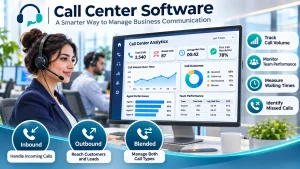
Call center software is a vertaul platform designed to manage call operations, optimize business workflows and reduce customer wait times.
How Call Center Software Helps Your Business
Whether your goal is to provide faster customer support, follow up with leads before they lose interest or help your sales team reach more prospects, the right software gives you better visibility into your team`s performance & helps you identify where your business is losing time and opportunities.
But not every solution offers the same capabilities. Before choosing The Best Call center Software provider you need to understand wich features can solve your specific business challenges.
The 3 Main Types of call center software
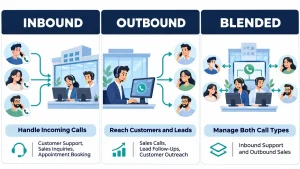
Inbound Call Center Software
When customers call with questions, support requests, billing issues, or appointment inquiries, your team needs a reliable way to handle those calls without leaving customers waiting or sending them between departments. Inbound call center software helps route calls to the right agents, manage call queues and improve the customer service experience.
Outbound call center software
If your business depends on sales calls, lead follow ups, customer surveys, or appointment confirmations, your agents need to reach the right people without wasting hours dialing numbers manually. Outbound call center software helps stream calling activities, so the team can spend less time on repetitive tasks and more time talking to potential and existing customers.
Blended call canter software
If your team handles both incoming customer inquiries and outgoing sales or follow up calls, a blended solution allows you to manage both activities within the same system. this gives you greater flexibility in allocating agents and managing your teams workload as business needs change.
Essential Call Center Software Features Every Business should look for
Whether your team handles customer support, sales calls, lead generation, or telemarketing campaigns, managing calls effectively is only part of the challenge. you also need to understand how your team performs, identify problems before they affect your customers and make better decisions about your business operations.
the right call center software gives you the tools to do that. here are two essential features to look for when choosing a solution.
1. Call Recording: Understand What Happens on Every Call
When a customer complains about a conversation or a sales agent struggles to convert leads, how do you know what actually happened? Without call recordings, you may have to rely on incomplete notes or different versions of the same conversation.
- Call recoding allows you to review customer interactions, evaluate how agents handle calls, and identify where communication breaks down. you can use these insights to provide targeted feedback and improve staff training, and maintain consistent service quality.
- It can also help you review disputed interactions when investigating customer complaints, subject to applicable privacy and recording regulations.
- For your business, this means less guesswork when resolving issues and a clearer way to understand what your team is doing well and where it needs support.
2. Call Analytics: Make Decisions Based on Performance Data
If you don’t know how many calls your team handles, how long customers wait, or how often calls go unanswered, its difficult to identify operational problems or determine whether your team has enough resources
- Call analytics gives you access to performance indicators that help you understand what’s happening across your call center. Historical reports help you track performance trends over time, while real time dashboards can help managers spot issues as they happen.
- Depending on the software, you may be able to monitor metrics such as call volume, average waiting time, missed calls, average handling time, and agent performance.
For example, if missed calls increase during peak hours, you can investigate staffing levels or call routing rules. If customers spend too long waiting, you can review queue management and agent availability.
- Instead of making decisions based on assuming, you can use actual call data to identify bottlenecks, allocate more effectively, and improve the customer experience.
- Call analytics goes beyond simply counting calls. It helps you understand how efficiently your team operates, where customers experience delays, and which processes need improvement.
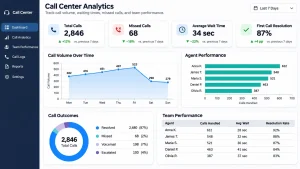
For example, if customers frequently abandon or leave calls before reaching an agent, you may need to review your waiting times or staffing levels. If your team resolves fewer issues during the first interaction, you can investigate whether agents need better training, access to information, or improved call routing processes.
- Depending on the platform, useful metrics may include average hold time, average talk time, call abandonment rate, first call resolution rate, customer churn, cost per call, and the percentage of calls sent to voicmail.
- You can use historical reports to track progress over time and real time dashboards to identify issues as they occur. Scheduled reports can also help managers maintain consistent performance reviews without having to compile data manually.
The result? Better visibility into your daily operations and more informed decisions about how to improve customer service, agent productivity, and operating costs.
3. Auto Dialers: Help Your Sales Team Spend More Time Talking to Prospects
- If your sales agents spend a significant part of their day manually dialing phone numbers, waiting for unanswered calls, or moving between contacts on a lead list, they have less time to focus on actual sales conversations.
- An auto dialer automates parts of the outbound calling process by dialing numbers from a contact list, reducing repetitive manual work and helping agents move more efficiently between calls.
- For businesses that rely on lead generation, appointment setting, telemarketing, or customer follow-ups, auto dialers can help teams work through contact lists more efficiently and dedicate more time to meaningful conversations.
- Different auto dialers work in different ways. For example, a power dialer automatically dials the next contact when an agent becomes available, helping maintain a steady calling workflow without requiring the agent to enter every number manually.
- Before choosing a solution, consider your team’s calling volume, the size of your contact lists, and how much control agents need over the pace of their calls. You should also check how the system handles unanswered calls and supports compliance with applicable telemarketing and consent requirements.
4. Call Monitoring: Improve Agent Performance and Resolve Problems Faster
When your team handles dozens or hundreds of customer calls every day, it’s difficult to know whether agents are following the right procedures, handling objections effectively, or providing accurate information. This becomes even more challenging when you’re onboarding new employees or trying to understand why certain calls fail to produce the desired results.
Call monitoring allows managers to listen to live conversations, assess how agents interact with customers, and identify situations where additional guidance is needed.
Depending on the solution, advanced monitoring features can give managers different levels of involvement:
- Listen-in: Listen to a live conversation to evaluate call quality or identify problems.
- Call Whisper: Give an agent real-time guidance without the customer hearing the manager.
- Call Barge: Join an ongoing conversation and speak directly with both the agent and the customer when intervention is necessary.
These capabilities can be particularly valuable for sales teams handling difficult objections, customer support teams dealing with complex complaints, and businesses training new agents.
Instead of waiting for a customer complaint or reviewing performance only after a problem occurs, managers can provide timely support, reinforce best practices, and help agents handle challenging conversations more effectively.
5. Interactive Voice Response (IVR): Route Customers Without Unnecessary Delays
When customers call your business, they want to reach the right department without being transferred repeatedly or waiting for someone to redirect their call. If every incoming call has to be answered and routed manually, your team can spend valuable time handling requests that could be organized automatically.
- Interactive Voice Response (IVR) helps streamline this process by presenting callers with a menu of options, such as pressing one for sales, two for customer support, or three for billing. Depending on the system, callers may also be able to respond using their voice.
- Based on the caller’s selection, the system can route the call to the appropriate department, queue, or destination.
- For your business, this means fewer unnecessary transfers, a more organized call-handling process, and less time spent directing customers to the right place. It can also help agents prepare for conversations when the system passes relevant caller selections or other available information to them.
- IVR can also support simple self-service workflows, such as providing recorded information or directing callers to the appropriate resources, reducing the need for agent involvement in certain routine inquiries.
The key is to design your menu around how customers actually seek help. An overly complicated menu can frustrate callers, so keep the options clear, limit unnecessary steps, and provide a practical route to a human agent when needed.
The right features make all the difference. Let’s find the call center solution that fits your business. Explore our services and talk to our team.
How Call Center Software Helped a Dental Clinic in Riyadh Identify Lost Bookings
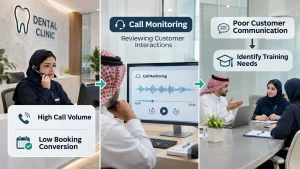
We once worked with a dental clinic group in Riyadh that was facing a frustrating problem. The clinics were receiving a high volume of incoming calls, but the number of patients actually booking appointments was surprisingly low.
As we worked with the clinic through its cloud call center system, we saw an opportunity to investigate what was happening during those conversations. The call monitoring feature allowed the clinic owner to listen to actual customer service calls and evaluate how the team was handling patient inquiries.
What we uncovered was eye opening!
The problem wasn’t a lack of potential patients calling the clinics. It was how those calls were being handled. Customer service representatives were giving poor responses and failing to communicate effectively with callers, leaving many potential patients without the guidance or reassurance they needed to proceed with a booking.
In other words, the clinic was already attracting potential patients, but the way its team handled incoming calls was costing it valuable booking opportunities.
By identifying the problem through call monitoring, the owner could see exactly where communication was breaking down and take steps to improve the team’s performance.
This is why call monitoring matters. You can’t fix a problem you can’t see. Listening to actual customer interactions can reveal issues that call volumes and performance reports alone might never uncover, helping you understand why potential customers aren’t converting and where your team needs to improve.